I read this post and watched the video--they both point out again the compelling reasons for schools to find ways to get technology into the hands of our teachers and students. Until it is IN THEIR HANDS it cannot have a real impact on teaching and learning. Technology tools need to be as ubiquitous as the pens and pencils that we "digital immigrants" had access to as we learned.
From Barry Golden, Educational Consultant, WI DPI:
Check out this awesome 4+ minute video:
Web 2.0 ... The Machine is Us/ing Us
Think about how your brain works compared to our kids.' The implications for how far behind we are in teaching and learning is incredible. Kids do this sort of thing every day at home but seldom at school. Do you suppose there is a relationship between boredom in school and the limited use of such digital tools because most of us in education don't know really know how to use them in a way that challenges students' mode of learning?
I would hope every administrator and school board member and politician would see this short video and then think about the 1970's curriculum our kids are forced to use every day. Our education is about 15 years behind society and the work place. How can we possibly prepare kids for the demanding careers of the 21st century when they are often times learning more outside of school than inside.
Friday, February 16, 2007


Thursday, February 15, 2007
Handheld Resources for administrators
Links to some handheld applications for school administrators
GoObserve
$ (99.95 as of 2/07) Demo download available. Works on Palm or PocketPC systems.
GoObserve provides observation scheduling through your desktop computer. After you synchronize your handheld, the observations are automatically added to your calendar. When in a classroom, the handheld component of GoObserve allows you to seamlessly "script" activities. Using categorization and time-stamping features, you can record, minute-by-minute, how teachers are doing and if students are engaged.
ScheduleFinder mobile student management tool for administrators
$
Automatically takes data from student management system for use on a Palm. In addition, the application integrates with many of the unique features of the various handheld devices (i.e. built-in digital cameras, cellular phones, barcode scanners) to offer even more powerful functionality. provides school Administrators instant access to all of their student information, photo IDs, and emergency plans on a palmOneTM handheld.
CFB Timer from Tucows (freeware)
This is a countdown alarm for timing anything from a few seconds to 99 minutes. It works even if your Palm is switched off or reset.
Countdown (freeware)
This application keeps track of the number of days until a certain date. Useful for counting down how many days until a test or until a much-needed vacation.
Power Walkthrough
$300 for software plus training costs which vary--contact McREL for pricing options.
McREL's Power Walkthrough software and training helps school leaders turn their regular classroom observations into “power walkthroughs” by using Palm or Windows Mobile hand-held devices loaded with McREL software that uses McREL's popular manual, Classroom Instruction that Works, as the basis for classroom observations. The software facilitates brief classroom visits that focus on effective instructional strategies, the level of student engagement, the use of technology, and several other factors that research has shown to influence student learning.
GoObserve
$ (99.95 as of 2/07) Demo download available. Works on Palm or PocketPC systems.
GoObserve provides observation scheduling through your desktop computer. After you synchronize your handheld, the observations are automatically added to your calendar. When in a classroom, the handheld component of GoObserve allows you to seamlessly "script" activities. Using categorization and time-stamping features, you can record, minute-by-minute, how teachers are doing and if students are engaged.
ScheduleFinder mobile student management tool for administrators
$
Automatically takes data from student management system for use on a Palm. In addition, the application integrates with many of the unique features of the various handheld devices (i.e. built-in digital cameras, cellular phones, barcode scanners) to offer even more powerful functionality. provides school Administrators instant access to all of their student information, photo IDs, and emergency plans on a palmOneTM handheld.
CFB Timer from Tucows (freeware)
This is a countdown alarm for timing anything from a few seconds to 99 minutes. It works even if your Palm is switched off or reset.
Countdown (freeware)
This application keeps track of the number of days until a certain date. Useful for counting down how many days until a test or until a much-needed vacation.
Power Walkthrough
$300 for software plus training costs which vary--contact McREL for pricing options.
McREL's Power Walkthrough software and training helps school leaders turn their regular classroom observations into “power walkthroughs” by using Palm or Windows Mobile hand-held devices loaded with McREL software that uses McREL's popular manual, Classroom Instruction that Works, as the basis for classroom observations. The software facilitates brief classroom visits that focus on effective instructional strategies, the level of student engagement, the use of technology, and several other factors that research has shown to influence student learning.
Thursday, February 8, 2007
Resources for Gadgets Go To School


Here are some links that I hope you find useful as you explore the use of "gadgets" for your classroom. Have fun!
Tony Vincent's Learning in Hand website is an absolute treasure.
On his site, you'll find loads of info including:
- A comprehensive listing of some great Palm software categorized by curriculum area. Almost all of the suggestions are freeware
- Practically everything you need to know about using an iPod in Education
- The basics of podcasts including Finding, Subscribing, Listening, and Creating them
- Educational research about using handhelds in the classroom weblinks
- Ben's Bargains blog that shares the latest "geek deals" on all the technology that you really, really want!
- Managing handhelds once you get a classroom set
More on iPods in Education:
Lorrie Jackson's article "Sites to See: iPod Resources" at Education-World's website. Included are case studies, info on podcasting, lesson plan ideas and discussion groups.
Karen Thompson's website which has links to student consumed and student created podcasts as well as teacher's tools. Karen is a teacher at the Springfield, IL School District.
You DON'T need an iPod to listen to a podcast--you can listen from your desktop or from a handheld device. From the PalmFocus website, an article titled "Listening to Podcasts on a Palm Device" shows a variety of ways you can do this. It includes links to a number of applications (free and inexpensive) that allow you to make your podcasts "to go!"
Finding & Subscribing to Podcasts:
iTunes Store Directory-Podcasts Apple iTunes is a free download available for Mac or PC.
Educational Podcast Network The Education Podcast Network is an effort to bring together into one place, the wide range of podcast programming that may be helpful to teachers looking for content to teach with and about, and to explore issues of teaching and learning in the 21st century. Most of the producers of these programs are educators.
Yahoo! Podcasts
Free or Low Cost Applications for Handheld Computers:
- FreeWare Website is an easy to use portal for hundreds of freeware and shareware handheld applications. CAUTION! There is a link to "mature content" on this site--not recommended for children.
- AvantGo is a free application that allows you to pull information from the web onto your handheld device. No wireless connection necessary.
- FlingIt™ allows users to instantaneously "fling" Web pages from the desktop computer to the handheld computer. Students can decide whether or not to include graphics and determine the link depth of the captured Web pages. Students can then view Web-based content at home, on the bus, or in their seats. FlingIt sites can also be beamed from one handheld computer to another for the sharing of Web-based resources.
- eReader allows you to read your eBooks whenever you want and wherever you go. You can use eReader to add bookmarks, navigate your eBooks easily, and search for words in your eBook. There is no charge to download and use the software. However, there is a feature-enhanced eReader Pro (which includes several free books such as Merriam-Webster's Pocket Dictionary) for $9.95.
- nosleep software open source project This project consists of a suite of innovative and useful applications for Palm OS, Mac OS, and Windows, that are all freely available. All of their software is completely free because they believe that some high-fidelity software should be available to anyone.
- PalmGear website Everything For Handheld Devices. Games, Apps, eBooks, Themes & More! Use the advanced search option and specify "freeware" or "shareware" when you search for information on this vast web resource.
Technology Podcasts and Blogs To Keep You In-the-Know:
Bill Daggett
Bit by Bit Bob Sprankle's podcast
Bob is an Elementary Technology Integrator in Well, ME. His blog/podcast is "a dumping place for thoughts, discoveries, links and tips."
Soft Reset Hosted by Tony Vincent and Mike Curtis.
You'll learn helpful tips, hear about useful resources, and listen to insightful discussion about topics handheld-using educators care about. Listen to them on your computer in your browser, in iTunes, on your handheld, or on your iPod.
2 Cents Worth David Warlick's blog
"Believing that learning about the world can be as exciting as the world really is"--that's the premise for this blog. David is a teacher, writer, and speaker who "can think of no better 'high' than helping to enrich some one's life by growing their knowledge, understanding, and skill" according to his homepage "At Your Service" introduction. He is the author of three books, including Redefining Literacy for the 21st Century
Connect Learning David Warlick's podcast
The Committed Sardine Ian Juke's blog
Ian Jukes has been a teacher, an administrator, writer, consultant, university instructor and keynote speaker. As the Director of the InfoSavvy Group, an international consulting group that provides leadership and program development in the areas of assessment and evaluation, strategic alignment, curriculum design and publication, professional development, planning, change management, hardware and software acquisition, information services, customized research, media services, and on-line training as well as conference keynotes and workshop presentations.
Weblogg-ed Authored by Will Richardson
“Learner in Chief” at Connective Learning and the author of the recently released Blogs, Wikis, Podcasts and Other Powerful Web Tools for Classrooms published by Corwin Press. This site is dedicated to discussions and reflections on the use of Weblogs, wikis, RSS, audiocasts and other Read/Write Web related technologies in the K-12 realm, technologies that are transforming classrooms around the world.
KidCast Podcast and Blog
Dan Schmit is an author and instructional technology specialist with the College of Education and Human Sciences at the University of Nebraska in Lincoln, Nebraska, USA. He has taught vocal and general music, worked as a staff developer and curriculum writer. He is a frequent presenter and clinician at state, regional and national instructional technology conferences and workshops. His work has focused on making learning experiences authentic and constructive through the use of technology. KidCast started off during the spring of 2005 as a professional development experiment that was focused on getting teachers and students started with podcasting. This quickly evolved into a writing project that soon produced KidCast: Podcasting in the Classroom (available from FTC Publishing). As the book became available Dan began to produce a companion podcast to the book.
Then check out Feed2Podcast which allows you to have your blog turned into a podcast. It's in its Beta version yet and the only "voice" you get is a pretty monotone "computer" type. I expect it will get better.
About.com has a great article on everything you need to know about RSS, Blogs and subscribing to them.
Resources for GPS's (Global Positioning Systems)
For the lots of information on how to use a GPS, click here for the Education Resource.
Click here for Berrien County Intermediate School District's terrific web page with tons of info about incorporating GIS/GPS in the classroom including lesson plans and more. GIS is a rapidly growing technological field that incorporates graphical features with tabular data in order to assess real-world problems.
Groundspeak forums has a forum for specifically for GPS in Environmental Education
You'll need to subscribe to post, but you can read any posts without doing so. Discussions range from how to purchase to how geocaching is used to teach a variety of subjects.
USGS-Science for a Changing World a professional geographer shares his thoughts on how to work with GPS as an excellent tool applicable to many disciplines, including mathematics, geography, earth science, environmental studies, and more.
US Geological Survey links to a variety of educational resources.
Whether you are an active player or have just heard about geocaching, you'll want to get your hands on this great video program. Get your questions answered. Share the sport with your friends. It's all right here in the official video of Geocaching.com.
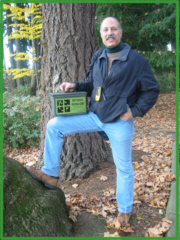
If you are into geocaching as a sport be sure to check out the official global GPS cache hunt site for a huge list of geocache sites (from beginner to advanced). A basic membership is free! If you create an account on geocaching.com they'll let you know when new caches are hidden in your area. You'll also have the ability to log your finds online to share your experience with the rest of the community.
Smartphones in the classroom? Yes, there are educational applications!
For more about using Smartphones in the classroom, click here for an interview with Bard Williams, Ed.D. about his newest book Handheld Computers And Smartphones In Secondary Schools: A Guide To Hands-On Learning available from ISTE the International Society for Technology in Education
More gadgets...How could you use them in your classroom?
Check out FLY, the world's first pentop computer by LeapFrog

How about a virtual keyboard that let's you type anywhere you project?

Nike's iPod sport kit
Since its August 2006 release, retailers have sold more than 450,000 Nike+iPod Sport Kits, according to industry publication AppleInsider. The $29 item consists of two parts. One piece is a chip the size of a dinner mint that acts as a pedometer, which runners slip into their shoe. The other piece is a receiver that fits into an iPod Nano and stores information beamed from the person's foot. After their workouts, high-tech runners can upload the data and use a Nike software program to track their distance, speed and calories burned. HOWEVER, according to an article by U of Washington researchers, the iPod sport kit could present invasion of privacy issues.
Not Here Yet, But Soon??
Resonantware
Near-Future Ubiquitous Networking Devices Visualized by Designers. Thanks to the development of ubiquitous technology, hardware is becoming smaller, thinner, and less visible than ever before. On the other hand, the volume of information we handle is expanding at an accelerated rate. In the near future, IT devices will go beyond the conventional framework of efficiency and convenience. NEC designers have created design possibilities with near future paradigms in mind: the world where humans and machines resonate with one another. We propose devices that judge situations to meet user’s needs, and interfaces that let users access unlimited information as naturally as breathing. (These are concept models and not planned to be commercialized at this point.)
My favorite of the moment, P-ISM


A pen-style personal networking gadget package including five functions: a pen-style cellualr phone with a handwriting data input function, virtual keyboard, a small projector, camera scanner and personal ID key with cashless pass function. Ultimate ubiquitous computing!
iPod lesson plan resources
iPod Resources


Lesson Plans
Apple has a collection of lesson plans created by teachers who are using iPods that are published online.
Many of these use an iPod external microphone. You can take a look at an extensive review of the options available. I chose Griffin's iTalkPro.
On the site, you will be able to download a pdf of the lesson plan and listen to a sample.
Here are some brief descriptions of some of the lessons you'll find there:
Radio Show: Students write a radio drama based on a historical event and record their show (complete with commercials) using an iPod and voice recorder
Listening to Letter Sounds: The teacher records a lesson onto an iPod using a voice recorder. Students follow the lesson and use an iPod to practice recording and listening to letter sounds.
Digital Science Experiments: Students listen to instructions prerecorded by their teacher on an iPod. They then record their science experiment using a digital camera and an iPod with a voice recorder and create an iMovie project.
Newcomers Learn Local History: English language learners create a presentation about their community and use an iPod and voice recorder to record it in both English and thier native language to share at a family night event.
Subscribe to:
Comments (Atom)

 Posts
Posts


